
On this page
- What do you need before you make a business website?
- Step 1: How do you buy a plan and a domain?
- Step 2: How do you set up a business email?
- Step 3: How do you build your pages?
- Step 4: How do you add contact details and Google Business?
- Step 5: How do you test your website and launch?
- What mistakes should beginners avoid?
- What are the honest limits of this plan?
- What should you do today?
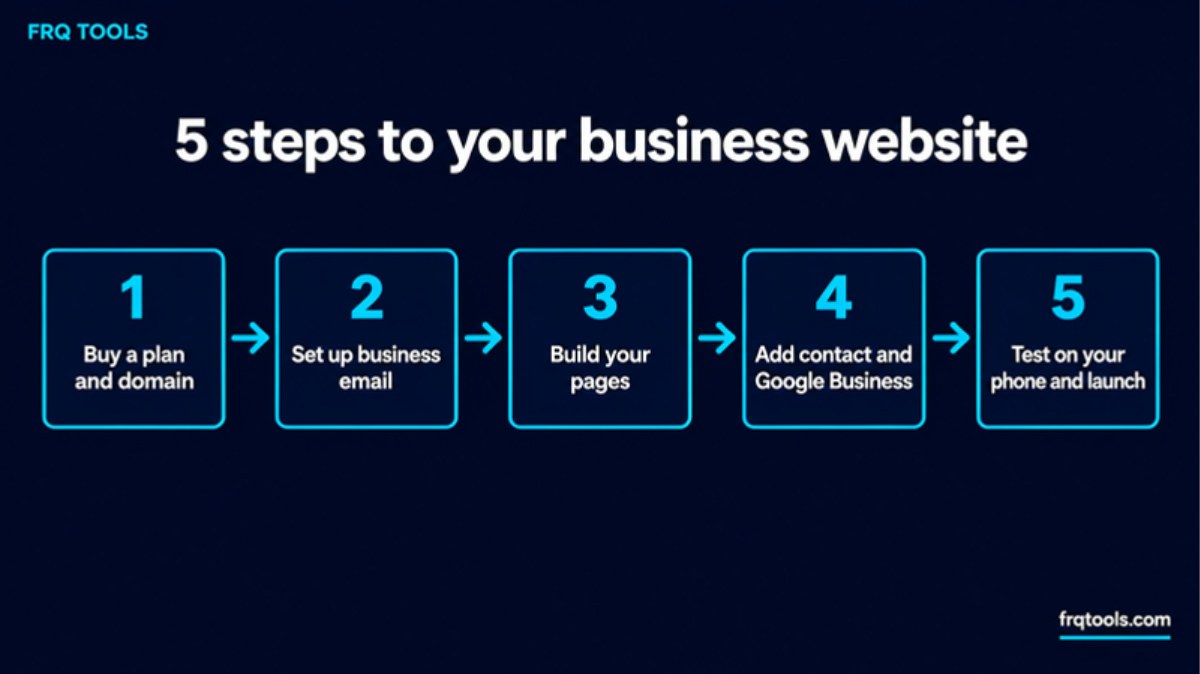
To make a website for your business, you do five things: buy a hosting plan and a domain name, set up a business email, build a few simple pages, add your contact details, and test it on your phone. You can finish all five in a weekend, even with no coding.
Step 1: get your website a home. This site has run on Hostinger since 2023. Our link takes 20% off your first order: Get started with Hostinger
Some links on this page are affiliate links. If you buy through them, I may earn a commission at no extra cost to you. Read our affiliate disclosure. The 20% is for first-ever Hostinger purchases only.
I am Fazal, and I build websites, tools and systems for small businesses from Lahore. This guide is the path I would give a friend who has never made a website. I explain each word the first time it appears.
What do you need before you make a business website?
You need three things. First, a domain name. This is your address on the internet, like yourbrand.com. Second, hosting. This is the computer that keeps your website files and shows them to visitors, all day and night. Third, content: your business name, what you sell, your phone number, a few photos and a short text about you.
That is all. You do not need a developer for a first version. You do not need a big budget either. If you want to see the full cost picture first, read our guide on how much a website costs in Pakistan.
Step 1: How do you buy a plan and a domain?
This is the first real step, and it is the one most beginners delay. Until you own a domain and hosting, you only have an idea. After you buy, you have a place to build.
Here is how I would do it, in order:
Open our Hostinger link. The 20% off your first-ever Hostinger order is applied through this link. If you already have Hostinger services, you will not get it.
Pick a plan from the table below. Most small businesses should start with Premium.
Choose 48 months if you can. It gives the lowest price per month. Choose 12 months if you want to pay less today.
Pick your domain name. Premium and the plans above it show a free domain for the first year on Hostinger's page.
Check the cart. Add business email if you need more than the included mailboxes, then pay.
Hostinger shows Visa, Mastercard and JazzCash on its page, with more options on its payments page. Its page also shows a 30 day money-back guarantee.
Which plan should you pick?
Prices below are the 48 month prices shown on Hostinger's Pakistan page on 16 November 2026. They are before the 20% referral discount and without VAT. Always read the price in your cart, because promotions change.
| Plan | Best for | Promo price | Renews at | Link |
|---|---|---|---|---|
| Premium | One business site or a blog. Up to 3 websites. | Rs.599/mo (Rs.28,752 for 48 months) | Rs.1,699/mo | Get this plan |
| Unlimited | More than one site, or a business that will grow. | Rs.699/mo (Rs.33,552 for 48 months) | Rs.2,299/mo | Get this plan |
| Cloud Startup | An online store or a busy site with many visitors. | Rs.2,099/mo (Rs.100,752 for 48 months) | Rs.5,399/mo | Get this plan |
Read the renewal column carefully. The low price is for the first term. After that, the plan renews at a higher price. This is normal for hosting, but you should know it before you pay. All plans are paid upfront, so you pay the full term at once.
My honest advice: do not buy a bigger plan than you need. A first business site on Premium is enough. You can move up later.
Step 2: How do you set up a business email?
An email like name@yourbrand.com looks far more trusted than a Gmail address. Customers notice. Hostinger's page lists free mailboxes with its plans for the first year, so set this up right after you buy.
Next step: if you have not bought yet, start here with 20% off your first order. Then come back to this step.
Make two or three addresses, not ten: one for you, one for sales or contact, and one for orders if you sell online. Keep it simple. Our guide on starting an online business in Pakistan explains where email fits in the bigger plan.
Step 3: How do you build your pages?
You have three ways to build. The right one depends on your time and your budget.
| Way to build | Good for | Main limit |
|---|---|---|
| Website builder or WordPress, done by you | Simple sites, small budget, you have a few free evenings | Takes your time. First pages may look plain. |
| Ready-made script from our store | A specific tool, like a calculator or booking form, that you upload to your own site | Fits some jobs only. Not a full website. |
| A developer builds it for you | Custom design, special features, no time to learn | Costs more. See our website development service. |
Hostinger's page says its plans work with an AI builder, WordPress and custom code. For most beginners, WordPress or the AI builder is the easiest start.
What pages does a small business site need?
Start with five pages, not twenty:
Home: what you do, who it is for, and one clear button, like Call Us or WhatsApp Us.
Services or Products: a short list with simple prices or a "ask for a price" button.
About: who you are, where you are, and why people can trust you.
Contact: phone, WhatsApp, email, address and a map.
Proof: real photos of your work. Use only real reviews from real customers. Never invent them.
If you do not have a logo yet, you can get one made by a freelancer. Fiverr Logo Maker is one option. A plain, clean name in a good font also works at the start.
Step 4: How do you add contact details and Google Business?
A website that people cannot contact is only a poster. Put your phone number and WhatsApp link at the top of every page. Make them big enough to tap with a thumb.
Then add your business to Google. A Google Business Profile helps people find you on Google Search and Maps. Google says you can add or claim your business at no charge. You go to business.google.com/add, enter your details, and choose a way to verify. If a profile for your shop already exists, claim it instead of making a second one.
Next, give each page a clear title and a short description. Google's own SEO starter guide says there are no secrets that automatically rank a site first, and that you should wait a few weeks to see if your work made a difference. So be patient.
Step 5: How do you test your website and launch?
Most of your visitors will be on a phone. Open your site on your own phone and check these things before you share it:
Does it open in a few seconds on mobile data?
Can you read the text without zooming?
Does the call button open the dialer?
Does the WhatsApp link open a chat with the right number?
Does the contact form send a message to your business email?
Speed matters. Google's web.dev says a good Largest Contentful Paint, which is how fast the biggest thing on the screen appears, is 2.5 seconds or less. Big photos are the usual reason for a slow site. Shrink them first with our free Smart Image Compressor. If your site is already slow, read how to speed up a slow WordPress site.
What mistakes should beginners avoid?
Waiting for the perfect site. Launch a simple version. Improve it every week.
Buying the biggest plan. Premium is enough for most first sites.
Ignoring the renewal price. Write the renewal date in your calendar.
Too many pages. Five good pages beat twenty weak ones.
Using stock claims you cannot prove. Say only what is true about your business.
What are the honest limits of this plan?
Three limits are worth saying out loud. First, the low price is for the first term, and renewal is higher, as the table shows. Second, shared plans like Premium and Unlimited are not made for very heavy sites. A busy store should look at Cloud Startup. Third, the 20% discount is only for your first-ever Hostinger purchase.
For my own experience, frqtools.com has run on Hostinger shared hosting since September 2023, with this site and several subdomains on one account. If you want my full view, including renewal prices, read the Hostinger review for Pakistan.
What should you do today?
Do not try to finish everything today. Do Step 1 now: choose a plan, pick your domain and pay. When you have a home for your website, the rest is just filling it in, one page at a time.
Ready to start? Buy your first plan through our link and get 20% off your first Hostinger order. Choose 48 months for the lowest monthly price, or 12 months to pay less now.
If you would rather have a custom website, a CRM or an automation built for your business, contact us and tell me what you need.
Related reading
Want this built for your business?
Tell us what slows you down. We reply on WhatsApp within an hour with a plan and a fixed price.