
On this page
- Why does a freelancer need a portfolio website?
- How do you make a freelancer portfolio website in 5 steps?
- Step 1: Which plan and domain should a freelancer buy?
- Step 2: How do you install WordPress?
- Step 3: What should a freelancer put on a portfolio website?
- Step 4: How do you make it easy for clients to contact you?
- Step 5: How do you test your portfolio website?
- What does a freelancer portfolio website cost?
- Your next step
A freelancer portfolio website is a small site with your best work, a short bio and a contact button. To make one: buy a plan and a domain, install WordPress, add three case studies, add a contact button, and test it on your phone. The first step is getting your site a home.
Step 1: get your website a home. This site has run on Hostinger since 2023. Our link takes 20% off your first order: Get started with Hostinger
Some links on this page are affiliate links. If you buy through them, I may earn a commission at no extra cost to you. Read the disclosure.
I am Fazal, and I build websites and business systems from Lahore. Many freelancers I talk to have a Fiverr or Upwork profile and nothing else. That works, until the platform changes its rules, its fees or its search. A portfolio site is the one place that is fully yours.
Why does a freelancer need a portfolio website?
Marketplace profiles are rented space. You follow their layout, their rules and their search. A portfolio website is your own shop, and it helps in three ways.
First, clients who find you on Google or from a link in a message see only your work, not ten other freelancers next to you. Second, you decide how your work is shown, with the case studies you choose. Third, you get a professional email address like name@yourname.com, which looks better than a free Gmail address when you send a quote.
A portfolio site does not replace Fiverr or Upwork. Use both. Keep the marketplace profile for finding work, and use your own site as the place where people check you out. Be careful with the rules, though. Upwork's legal terms say users may not go around the platform, for example by sharing contact details to work outside it before a contract is agreed. So do not use your site to pull a marketplace client away from the platform. Use it for clients who find you directly.
How do you make a freelancer portfolio website in 5 steps?
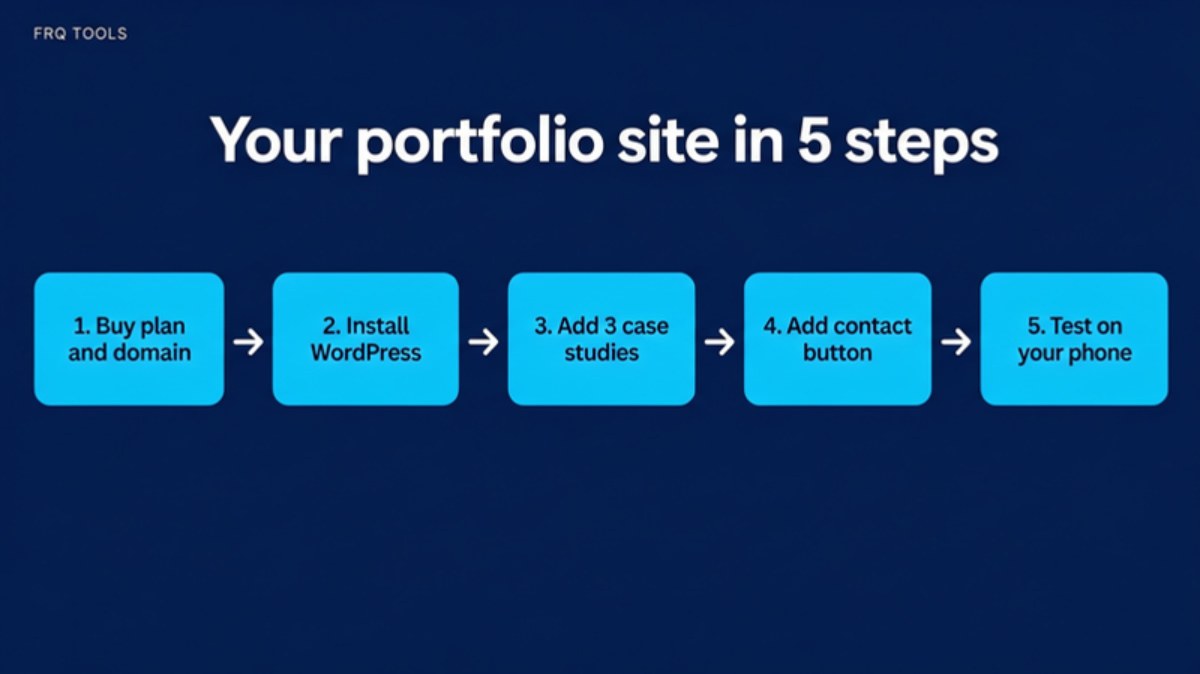
Here is the whole path in one picture. Each step is explained below.
Step 1: Which plan and domain should a freelancer buy?
You need two things before anything else: a domain (your web address, like yourname.com) and hosting (the computer that keeps your site online all day). Think of the domain as your shop address and hosting as the shop itself.
I run frqtools.com on Hostinger shared hosting, and it has been my setup since September 2023. I build my tools, store and blog on it. Here is how I would buy for a freelancer.
Open our link: Hostinger through our referral link. The 20% off applies to your first-ever Hostinger purchase. If you already have Hostinger services, you will not get it.
Pick Premium. It lists 3 websites, so you can run your portfolio and one more site, for example a second brand or a test site.
Choose 48 months for the lowest price per month. If that is too much to pay now, choose 12 months and pay less today. The monthly price is higher on shorter terms. Hostinger's page showed only the 48 month prices when I checked, so look at the cart for the others.
Choose your domain name. If you have not decided yet, read my guide on how to choose a domain name for your business first.
Add your business email at checkout, or set it up later. Premium lists 2 mailboxes per website, free for 1 year. My post on business email with your own domain shows the steps.
Ready to start? Buying the plan and domain is the longest part of the job, and it takes about ten minutes. Take 20% off your first Hostinger order
Which plan fits a freelancer?
These are the prices Hostinger's Pakistan page showed on 21 November 2026. They are on a 48 month term, before the 20% referral discount, and the page says prices are listed without VAT. The page was running a "Blessed Friday" sale with no end date shown, so check the price again at checkout.
| Plan | Best for | Price per month, 48 months | Renews at, per month | Link |
|---|---|---|---|---|
| Premium | One portfolio site plus one more site | Rs.599 | Rs.1,699 | Get this plan |
| Unlimited | Many client sites or a portfolio plus a store | Rs.699 | Rs.2,299 | Get this plan |
| Cloud Startup | A busy site with a lot of visitors | Rs.2,099 | Rs.5,399 | Get this plan |
For a portfolio, Premium is enough for most people. A portfolio is a handful of pages with images. It does not need heavy power. Choose Unlimited only if you plan to build sites for your own clients on the same account.
What are the limits you should know about?
Renewal prices are higher. The low price is for the first term. After it, Premium renews at Rs.1,699 per month on the same 48 month term, according to Hostinger's page.
You pay upfront. The page says all plans are paid upfront, and the monthly figure is the total divided by the months. On 48 months, Premium is Rs.28,752 in one payment before the referral discount.
The 20% is for first purchases only. It does not apply if you already have a Hostinger account with services.
The free domain needs a check. The page says the domain is free for 1 year on Premium, Unlimited and Cloud Startup, and mentions yearly plans. I could not tell whether a 48 month plan qualifies, so read the checkout page before you pay.
There is a refund window. The page states a 30 day money-back guarantee. Read the refund policy for the details.
Hostinger shows Visa, Mastercard and JazzCash as payment options, with more on its payments page.
Step 2: How do you install WordPress?
Hostinger lists WordPress, an AI Builder and custom code as ways to build on every plan. For a portfolio, I suggest WordPress. It is common, there are many free themes, and any developer can help you later.
After you buy, the control panel guides you through creating a website. Choose WordPress, connect your domain, and pick a simple theme. Pick one that looks clean with big images and plenty of white space. Skip themes with sliders and animations. They slow the site and distract from your work.
If you would rather not do it yourself, I also build WordPress sites for freelancers and small businesses. See my website development service. If you want to learn the full basics first, my beginner guide to making a website covers them in more detail.
Step 3: What should a freelancer put on a portfolio website?
Less than you think. A good portfolio has five pages, and each has one job.
| Page | What it does | What to put on it |
|---|---|---|
| Home | Says who you help in one sentence | A headline, one line about your skill, three best projects, a contact button |
| Work | Proves you can do the job | Three case studies, each with a before and after |
| About | Builds trust | Your photo, your story in a short paragraph, your tools and skills |
| Services | Tells people what to buy | What you offer, who it is for, how you work, a starting price if you can |
| Contact | Makes it easy to hire you | Email, WhatsApp link, a short form |
How do you write a good case study?
Use the same four parts for every project. Keep each one to a few lines.
The problem. What did the client need?
What you did. Your steps, in plain words.
The result. Show what changed. Use real numbers only if you have them. If a client did not share numbers, describe the result in words and do not invent figures.
Proof. A screenshot, a link to the live work, or a short quote that the client agreed to share.
If you are new and have no client work yet, make two or three sample projects for an imaginary business and label them clearly as samples. That is honest, and it still shows how you think.
One tip for your logo and name: a simple text logo is fine. If you want a designer to make a small logo for your brand, you can find a logo designer on Fiverr. You do not need one to start.
Step 4: How do you make it easy for clients to contact you?
A portfolio that does not get you messages has failed. Put a contact button at the top and at the bottom of every page. Give people three ways to reach you: email, WhatsApp and a short form. Many clients in Pakistan prefer a WhatsApp message to an email, so a WhatsApp link is worth having.
Keep the form short. Name, email and a box for what they need is enough. Reply fast. A freelancer who answers within a few hours often wins over one with a better portfolio who answers in two days.
Then connect your email address. A message from name@yourname.com looks more serious than one from a free email account. Add your portfolio link to your Fiverr, Upwork and LinkedIn profiles where the platform rules allow it.
Step 5: How do you test your portfolio website?
Most visitors will open your site on a phone. So test it on yours before you tell anyone about it.
Open every page on your phone and tap every button.
Check that your text is easy to read without zooming.
Send a test message through your contact form and confirm it arrives.
Ask a friend to open the site and tell you what you do in ten seconds. If they cannot say it, rewrite your home page headline.
How do you keep it fast?
Big images are the usual reason portfolios feel slow. Google's guide to Largest Contentful Paint says a good load time for the main content is 2.5 seconds or less, measured at the 75th percentile of visits. Your biggest image is often that main content.
Resize your project images to the width the page really shows. Then compress them. My free Bulk Image Resizer and Smart Image Compressor do this in your browser, and the compressor page says your files stay on your device.
Will your portfolio show up on Google?
Maybe, but nobody can promise it. Google's own SEO starter guide says there are no secrets that automatically rank your site first. It asks for helpful, people-first content, and for page titles that are clear and say what the page is about. So give each page a clear title, like "Logo designer in Lahore" instead of "Home". Then share your link in the places where your clients already are.
What does a freelancer portfolio website cost?
The main costs are the plan and the domain. On Premium, Hostinger's page showed Rs.599 per month on a 48 month term, which is Rs.28,752 in total before the referral discount and before VAT. Add the domain if your checkout does not include it free. Themes can be free. A logo is optional.
I wrote a longer cost breakdown in how much a website costs in Pakistan. If you are weighing Hostinger itself, my Hostinger review for Pakistan covers three years of real use, including the renewal price.
If you later want to add features like forms, a client login or a small shop, the FRQ store has ready-made scripts that you upload to your own website.
Your next step
Do not wait until your portfolio is perfect. Buy the plan and domain today, put up three projects and a contact button this week, and improve the site as you go. A simple live site wins more clients than a perfect one that is still in your head.
Start with Step 1: get your website a home with Hostinger and take 20% off your first order.
If you want a custom CRM, automation or a professional website built for you, contact us and tell me what you need.
Related reading
Want this built for your business?
Tell us what slows you down. We reply on WhatsApp within an hour with a plan and a fixed price.