
On this page
- What should an appointment reminder SMS say?
- Which appointment reminder SMS template should a clinic use?
- Which reminder works for a salon or barber?
- Do SMS reminders really reduce missed appointments?
- When should you send the reminder?
- How do you send appointment reminders free from an Android phone?
- What does a daily reminder routine look like?
- How long can the message be?
- What about consent and privacy?
- When is a bulk SMS app not enough?
- What should you do today?
Here is an appointment reminder SMS template you can copy: "Dear {first_name}, your appointment at [Clinic] is tomorrow at [time]. Please arrive 10 minutes early. To change it, call [number]." Send it the day before. Below are more versions for clinics and salons, plus a free way to send them from your own phone.
I am Fazal, a solo developer in Lahore, and I build FRQ SMS Sender, the free app mentioned in this guide. You can use every template here with any phone or any app.
What should an appointment reminder SMS say?
A good reminder answers five questions in a few seconds. Who is it for? Who sent it? When is the visit? What should I do? How do I change it?
| Part | Example | Why it matters |
|---|---|---|
| Name | Dear Ayesha | The person knows it is for them |
| Business | City Care Clinic | An unknown number with no name looks like spam |
| Day and time | tomorrow at 5:30 PM | This is the main point of the message |
| Action | arrive 10 minutes early | Tells them what to do next |
| Way to change | call 0300 0000000 | A cancelled slot can go to someone else |
For clinics, keep health details out. The Medical Protection Society, which advises doctors, says in its guidance on texting patients that details beyond the date and time are not needed. That advice was written for Ireland, but it is sensible anywhere. Family members often see a phone screen. Do not write "your skin infection follow up" or "your test result".
Which appointment reminder SMS template should a clinic use?
Replace the words in [square brackets] before you send. {first_name} is a placeholder, which means a space the app fills with each person's own name.
The day before
Dear {first_name}, your appointment at [Clinic] is tomorrow at [time]. Please arrive 10 minutes early. To change it, call [number].
The same day
Dear {first_name}, a reminder of your visit to [Clinic] today at [time]. If you cannot come, please call [number].
After a missed visit
{first_name}, you missed your appointment at [Clinic] today. To book a new time, call [number].
Roman Urdu
{first_name}, aap ki appointment kal [time] baje [Clinic] mein hai. Time badalna ho to [number] par call karein.
Which reminder works for a salon or barber?
Salon messages can sound a little warmer. Still keep them short.
The day before
Hi {first_name}, your booking at [Salon] is tomorrow at [time]. Need to change? Call [number]. Reply STOP to opt out.
The same day
Hi {first_name}, see you today at [time] at [Salon]. Running late? Please call [number].
Ask for a confirmation
Hi {first_name}, your [Salon] booking is on [day] at [time]. Reply YES to confirm or call [number] to change.
The last one is useful for long services such as bridal makeup, where one empty slot can cost you half a day. Only ask for a reply if someone will read the replies.
Need offers, fee notices or order messages too? See our other bulk SMS templates for business.
Do SMS reminders really reduce missed appointments?
For healthcare, there is research. A Cochrane review published in 2013 (a Cochrane review collects and weighs many studies) compared reminders sent by mobile message with other options.
| Type of reminder | People who attended |
|---|---|
| No reminder | 67.8% |
| Text message | 78.6% |
| Phone call | 80.3% |
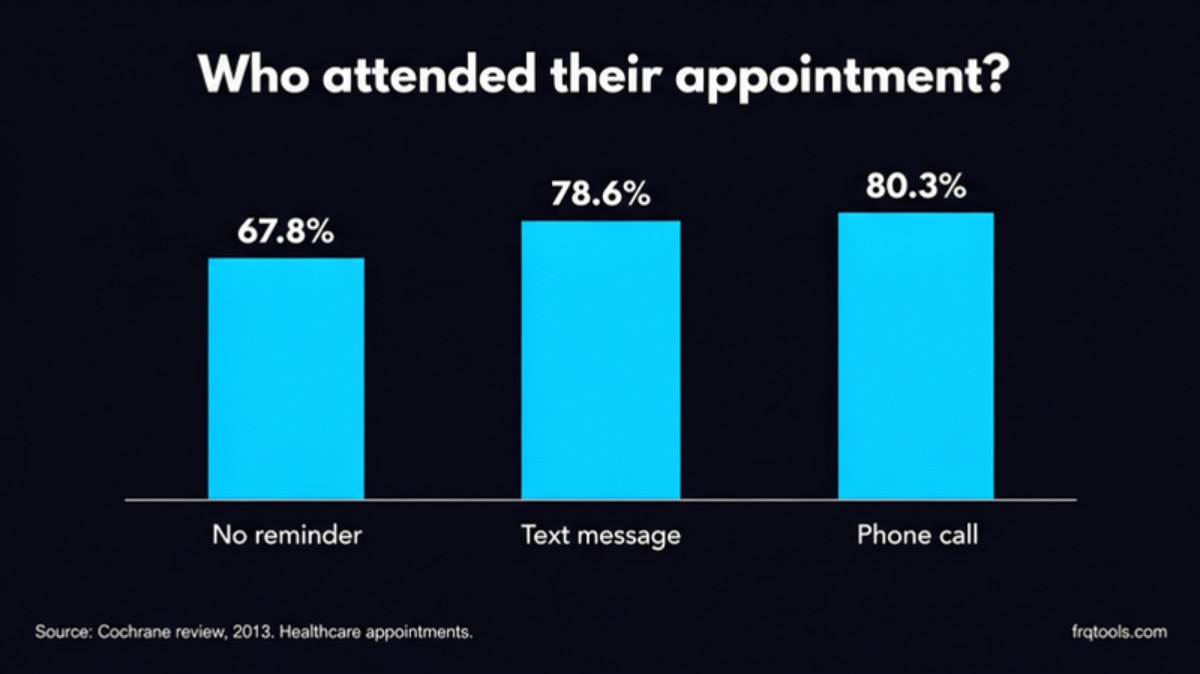
Text reminders did better than no reminder, and about as well as phone calls. Two studies in the review also found texting cost less than calling.
Be careful with these numbers. The authors rated the evidence low to moderate quality, and the review is old. It studied healthcare visits, not salons. Your own results may be higher or lower. The simple test is to count your missed bookings for two weeks, start reminders, then count again.
When should you send the reminder?
My suggestion, as a starting point and not a rule:
The evening before. People can still change plans, and you have time to fill the slot.
The same morning, only for long or costly services, or for people who have missed before.
At booking time, if the visit is more than a week away, so they can save the date.
Do not send late at night or very early. Two messages for one visit is usually enough. Too many reminders annoy people.
How do you send appointment reminders free from an Android phone?
FRQ SMS Sender is a free app for Android 7.0 and newer. It sends from your own phone and SIM, so there is no panel and no per message fee from the app. Your normal SMS package or network charges still apply. The app shows a few ads, and watching one short video removes them for 24 hours.
One honest limit first: the product page does not offer timed or automatic sending. You press send yourself. Also, the only placeholders it lists are for names: {first_name}, {last_name} and {full_name}. It does not fill appointment times for you.
That is why the best method is to send one campaign for each time slot.
Step 1: Install and set it up
Get the app from Google Play. It asks to become your default SMS app, which means the main app for text messages. Android needs this for bulk sending and status tracking. You can switch back at any time.
Step 2: Make tomorrow's groups
Open your booking diary. Make one group for each time, for example "Tue 5 PM" and "Tue 6 PM". You can type contacts, pick them from your phonebook, or import an Excel (.xlsx) or CSV file with a header row and two columns, such as Name and Phone. Our guide on how to send bulk SMS from Excel shows the file layout.
If your numbers are written in many different ways, clean them first with the free Phone Number Formatter.
Step 3: Write the message once per slot
Paste your template, keep {first_name}, and type the real time, such as 5:00 PM. Check the live preview. You can save messages you use often, and add your signature to every message.
If every person has a different time, you have two choices. Write "tomorrow" with a request to call and confirm the time, or send those few messages one by one. For a small salon with six bookings, one by one is often fine.
Step 4: Set a delay and send
Set a delay between messages and watch the daily count. On a dual SIM phone you can choose which SIM sends. SMS does not need internet.
Step 5: Check the report and replies
The app shows sent, delivered and failed counts. You can resend only the failed ones in one tap. For SMS campaigns it also shows how many people replied. People who reply STOP go on your block list, so your next campaigns skip them.
What does a daily reminder routine look like?
Pick one fixed time, such as 6 PM, and give the job to one person.
| Task | What to check |
|---|---|
| Open tomorrow's bookings | Remove cancelled and moved visits |
| Group people by time slot | Names and numbers are correct |
| Send one campaign per slot | The time in the text matches the group |
| Check the report | Call anyone whose message failed twice |
| Read replies | Move bookings and offer free slots to others |
Delete or rename old groups so that yesterday's list is never used again. Sending the wrong time is worse than sending nothing.
How long can the message be?
One English SMS holds up to 160 characters. Longer messages are split into parts of 153. If the text uses characters outside the basic SMS alphabet, such as Urdu script, one message holds only 70, and each part of a longer one holds 67. These limits are listed in the AWS SMS character limit guide.
The templates above fit in one SMS with a short name, business name and phone number like our examples. A long salon name can push them over. Even one curly quote mark can change the encoding, so type your text simply. Each part may be counted by your network as a separate SMS.
What about consent and privacy?
Ask first. At booking, say: "May we send you a reminder by SMS?" Having a number is not the same as having permission.
Keep a note of who said yes and who said no.
Offer a way out. Honour STOP, or any clear request to stop.
Keep offers separate. A reminder should not turn into an advert.
Protect the list. Lock the phone and limit who can open it.
The product page says your groups, contacts and campaigns are saved on your phone and are not uploaded to our servers. Your network still carries each SMS, and rules differ by country, so check what applies to your business. Mobile operators also set their own sending limits, and no app can remove them.
When is a bulk SMS app not enough?
The manual method suits a clinic or salon with a manageable daily list. You may need a booking system with automatic reminders if you have many different times each day, several branches, or staff who forget the evening task. If so, choose a system that sends from the booking record, so nobody has to retype the time.
What should you do today?
Copy one template, put in your business name and number, and send it to your own phone first. Then get FRQ SMS Sender free and try it with tomorrow's first time slot.
Want reminders that go out from your booking sheet or CRM without manual work? I build custom CRM, automation and website systems for small businesses. Contact FRQ TOOLS and tell me how you take bookings now.
Related reading
Want this built for your business?
Tell us what slows you down. We reply on WhatsApp within an hour with a plan and a fixed price.