
On this page
- What makes a good bulk SMS template?
- How long can one SMS be?
- Which bulk SMS templates can shops use?
- Which bulk SMS templates can clinics use?
- Which bulk SMS templates can academies and schools use?
- Which templates work for any business?
- Do you need permission to send promotional SMS?
- How do you send these templates with FRQ SMS Sender?
- What happens when people reply or say stop?
- What mistakes should you avoid?
- What should you do next?
A good bulk SMS template is short, says who you are, gives one clear reason for the message, asks for one action, and lets people opt out. Below are 12 templates you can copy for shops, clinics and academies, plus a simple way to write your own.
I am Fazal, and I build FRQ SMS Sender, a free Android app for sending SMS campaigns from your own phone. Many shop owners tell me the hard part is not sending. It is knowing what to write. So here are real wording examples you can change in two minutes.
What makes a good bulk SMS template?
A template is a message you write once and use again and again. A good one has five parts. You do not need all five every time, but the first three are almost always needed.
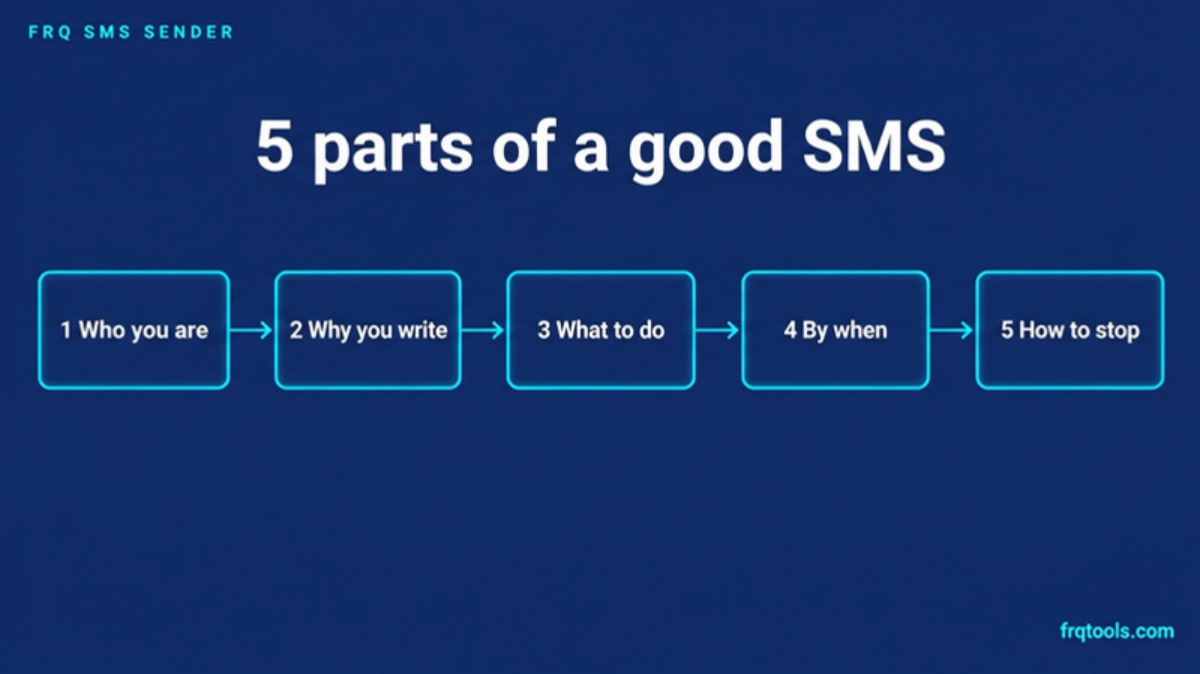
Who you are. Put your shop or clinic name in the message. People ignore texts from unknown senders.
Why you write. One reason only: a sale, a reminder, an order update.
What to do. Visit, call, reply or pay. Pick one.
By when. A date or time makes people act. Skip it if it does not fit.
How to stop. For promotions, add a line like "Reply STOP to opt out".
Use the person's first name when you can. "Hi Ahmed" feels like a message from a real shop. "Dear customer" feels like spam.
How long can one SMS be?
Length matters because long messages are split into parts, and each part counts as one message on your SIM package. Amazon's SMS documentation gives the standard limits: a normal English message holds up to 160 characters. When a message is longer, it is cut into parts of 153 characters each. If you use Urdu script or any special character, the limit drops to 70 characters, or 67 per part when split.
| Type of text | One message | Per part when split |
|---|---|---|
| English or Roman Urdu | 160 characters | 153 characters |
| Urdu script or special characters | 70 characters | 67 characters |
The same page warns about one sneaky detail. A curly apostrophe, the kind that word processors add, is not in the basic character set. One curly apostrophe can push your whole message into the 70 character limit. When you write templates, type a plain straight apostrophe or avoid it.
All 12 templates below stay well under 160 characters, even after a name is added.
Which bulk SMS templates can shops use?
Shops usually send three kinds of messages: new stock, offers and order updates. Keep them friendly and specific. The shop name below is an example. Replace it with yours.
| Template name | Message | Characters |
|---|---|---|
| New stock | Hi {first_name}, new winter stock is in at Noor Garments, Model Town. Visit us today till 9 pm. Reply STOP to opt out. | About 111 |
| Order ready | Hi {first_name}, your order is ready for pickup at Noor Garments. Please collect it by Saturday. Thank you. | About 100 |
| Sale notice | Hi {first_name}, our weekend sale starts Friday at Noor Garments. Up to 30% off selected items. Reply STOP to opt out. | About 111 |
| Delivery update | Hi {first_name}, your parcel is on the way and will reach you today. Please keep your phone nearby. | About 92 |
Character counts are worked out with a five letter first name in place of {first_name}. A longer name adds a few characters.
Which bulk SMS templates can clinics use?
Clinics send the most useful messages of all: reminders. A reminder the day before an appointment helps patients show up and helps you fill your day. Keep medical details out of SMS. Say only that a report is ready or a visit is due. Texts can be read by anyone who picks up the phone.
| Template name | Message | Characters |
|---|---|---|
| Appointment reminder | Dear {full_name}, reminder: your appointment at City Care Clinic is tomorrow at 5 pm. Reply YES to confirm. | About 106 |
| Follow-up | Dear {full_name}, City Care Clinic here. Please call us if your symptoms have not improved. Thank you. | About 101 |
| Report ready | Dear {first_name}, your lab report is ready at City Care Clinic. Collect it from 10 am to 8 pm. | About 88 |
Which bulk SMS templates can academies and schools use?
Academies and tuition centres message parents, not students. So write to the parent and name the child. Fee reminders work best when they are polite, give the due date and say where to pay.
| Template name | Message | Characters |
|---|---|---|
| Fee reminder | Dear parent, the March fee for {first_name} is due on 10 March. Please pay at the office. Bright Academy. | About 98 |
| Class change | Hi {first_name}, tomorrow's maths class moves to 4 pm. Same room. Bright Academy. | About 74 |
| New batch | Hi {first_name}, our new English batch starts on 1 April at Bright Academy. Seats are limited. Reply STOP to opt out. | About 110 |
Which templates work for any business?
Two short messages fit almost any business. A thank you after a purchase, and a reminder written in Roman Urdu for customers who prefer it. Roman Urdu uses normal English letters, so it keeps the 160 character limit. Urdu script does not.
| Template name | Message | Characters |
|---|---|---|
| Thank you | Thank you for shopping with us, {first_name}. We hope to see you again soon. | About 69 |
| Roman Urdu reminder | Assalam o Alaikum {first_name}, kal aap ka appointment 5 baje hai. Barah-e-meherbani waqt par aayein. Shukriya. | About 104 |
Do you need permission to send promotional SMS?
Yes, you should have it. ProPakistani reported in 2022 that under new PTA regulations, telemarketers may send promotional SMS only to people who have opted in, and promotional messages must include a way to unsubscribe. Sending without consent is described there as a reportable offence. Rules can change, so check the PTA's current position. I am not a lawyer, and this is not legal advice.
In plain terms, send promotions only to people who gave you their number for that purpose, such as customers who joined your list, parents of enrolled students and patients with appointments. Add an opt-out line to promotions. For reminders about something the person already booked or paid for, the opt-out line is less important, but it never hurts.
How do you send these templates with FRQ SMS Sender?
FRQ SMS Sender is free to use and sends from your own Android phone and SIM. There is no website panel and no per-message fee from the app. Your normal SMS package or carrier rates still apply. The app shows a few ads to stay free, and you can watch one short video to use it without ads for 24 hours.
Install the app from Google Play and set it as your default SMS app. Android only lets the default SMS app send in bulk and track status. You can switch back any time. It needs Android 7.0 or newer.
Make a group. Add contacts by typing, from your phonebook, or by importing an Excel or CSV file. My guide to sending bulk SMS from Excel shows how to lay out the sheet.
Write or choose your message. The app has Templates and Signatures. Its page says you can save messages you send often and add your signature to every message automatically. Type {first_name}, {last_name} or {full_name} in your text and check the live preview before you send.
Send and track. Watch sent, delivered and failed counts update live. You can resend only the failed ones in one tap.
The app also lets you set a delay between messages and shows your daily count. Carriers can have their own daily limits, so start with small groups. If you are new to the app, read how to send bulk SMS from your Android phone for free first.
Try it: Get FRQ SMS Sender, a free Android app for bulk SMS from your own SIM.
What happens when people reply or say stop?
Replies are good news. The app has reply tracking for SMS campaigns: each campaign shows how many people replied and who, and replies within 7 days of the campaign are counted. You can save repliers as a new group or send a follow-up to the people who did not reply. The app's page says people who reply STOP show as opted out and go on a block list that later campaigns skip. Reply tracking works for SMS only, not for WhatsApp campaigns.
This is why templates with "Reply YES to confirm" work well for reminders. You get a count of confirmed patients or parents without making a single call.
What mistakes should you avoid?
Sending one long block of text. Two short messages beat one long one. Long messages split into parts and cost more.
Forgetting the sender name. If the shop name is missing, people think it is spam.
Sending at night. Send during normal hours, usually between 10 am and 8 pm.
Putting private details in the text. Never include test results, balances or ID numbers.
Using the same text for everyone. A first name and a specific detail make a big difference.
If you also want to reach people on WhatsApp from a Windows PC, that is what FRQ Reach is for. WhatsApp's own terms limit bulk messaging on the normal app, so no tool removes the risk. SMS from your own SIM is a simpler place to start for reminders.
What should you do next?
Pick three templates from this page, change the names and times, and send them to a small group of five or ten people you know. Check the delivery report. Then grow the list slowly. The free app is here: FRQ SMS Sender.
Need something bigger, like a custom CRM, automatic reminders or a website that collects customer consent? Contact us and tell us what you need.
Related reading
Want this built for your business?
Tell us what slows you down. We reply on WhatsApp within an hour with a plan and a fixed price.