
On this page
- What do you need before you buy Hostinger in Pakistan?
- Step 1: How do you open the link and get 20% off?
- Step 2: Which Hostinger plan should you pick?
- Step 3: Should you choose 48 months or 12 months?
- Step 4: How do you add a domain and business email?
- Step 5: Which payment methods work in Pakistan?
- What is the refund policy?
- What happens after you pay?
- What are the honest limits of buying Hostinger?
- What should you do today?
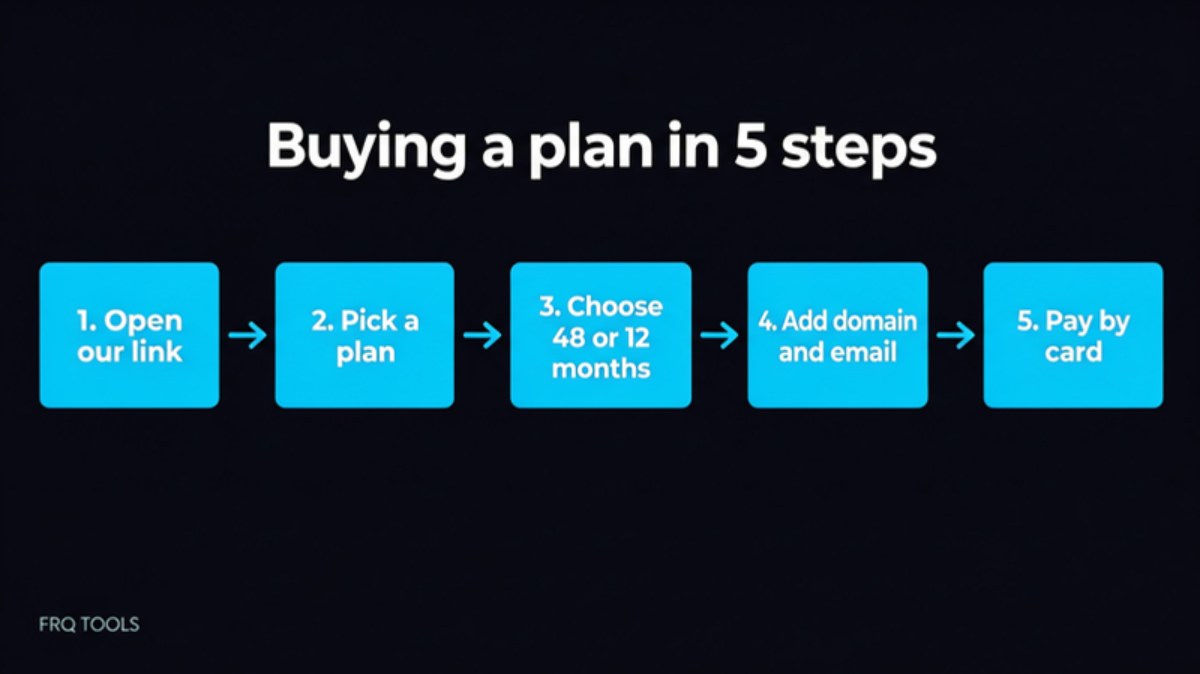
To buy Hostinger in Pakistan, open our referral link, pick a plan, choose a term, add your domain and pay by card. The whole checkout takes about ten minutes. The discount is applied through the link, so open it first.
Step 1: get your website a home. This site has run on Hostinger since 2023. Our link takes 20% off your first order: Get started with Hostinger
Some links on this page are affiliate links. If you buy through them, I may earn a commission at no extra cost to you. Read our affiliate disclosure. The 20% is for your first-ever Hostinger purchase only.
I am Fazal, and I build websites, tools and systems for small businesses from Lahore. Many people ask me how to actually pay for hosting from Pakistan. This guide shows the steps, the payment methods that work today, and the limits you should know before you pay. I explain each new word the first time it appears.
What do you need before you buy Hostinger in Pakistan?
You need four things ready before you open the checkout page.
A domain name idea. A domain is your address on the internet, like yourbrand.com. If you are not sure, read our guide on how to choose a domain name for your business first.
A working card. Hostinger lists Visa and Mastercard for Pakistan. Check that your card allows online payments in international currency or that your bank allows it. If a payment fails, your bank is the first place to call.
An email address you can open. You need it to create your Hostinger account.
A clear idea of what you are building. One business site, a blog, a store or a portfolio. This decides your plan.
Step 1: How do you open the link and get 20% off?
Open our Hostinger link. It takes you to Hostinger's referral page, which says the discount is applied to the first term of a new plan. You do not need to type a code. The page says the discount is tied to the link you came in on.
Three honest limits. First, the 20% is for the first term only. It does not apply to renewals. Second, if you already have Hostinger services, you do not get it. Third, the page says other promo codes do not add anything on top. Also, the page says the discount stays available through the link for 7 days, so open the link when you are ready to buy, not weeks before.
Ready to buy? Open the link and get 20% off your first Hostinger order. Then come back here for the next steps.
Step 2: Which Hostinger plan should you pick?
These are the prices on Hostinger's Pakistan page on 23 November 2026. They are for 48 months, before the 20% referral discount, and the page says prices are listed without VAT. A Blessed Friday sale was running with no end date shown, so always read the final price in your cart.
| Plan | Best for | Promo price | Renews at | Link |
|---|---|---|---|---|
| Premium | One simple business site or blog. 3 websites, 20 GB SSD. | Rs.599/mo (Rs.28,752 for 48 months) | Rs.1,699/mo | Get this plan |
| Unlimited | More than one site, an online store, or growth. Unlimited websites, 50 GB NVMe. | Rs.699/mo (Rs.33,552 for 48 months) | Rs.2,299/mo | Get this plan |
| Cloud Startup | A busy site or a bigger store. Unlimited websites, 100 GB NVMe. | Rs.2,099/mo (Rs.100,752 for 48 months) | Rs.5,399/mo | Get this plan |
Read the renewal column. The low price is for the first term, and the plan renews higher after that. Plans are paid upfront, so you pay the whole term at once.
Which plan is right for you?
Premium is enough for one business site, a simple blog or a portfolio. Unlimited is my pick if you plan more than one website or an online store, because the plan card lists ecommerce as free for one year. Cloud Startup is for sites with a lot of visitors, and most beginners do not need it. Hostinger also shows a cheaper Single plan on its page, but it is not offered through our referral, so I do not recommend it here.
Not sure what to build yet? Our guide on how to make a website for your business walks through the choices.
Step 3: Should you choose 48 months or 12 months?
Choose 48 months if you can. It gives the lowest price per month, and Hostinger's page shows only the 48 month prices on its plan cards. Choose 12 months if you want to pay less today and you are happy to pay a higher monthly rate. The cart shows the exact amount for each term, so compare them before you pay.
Do not choose a one month plan for a real business. It costs more per month and you will need to renew again and again.
| Term | What you pay now | Good for |
|---|---|---|
| 48 months | The most money upfront, the lowest price per month | A business you plan to run for years |
| 12 months | Less money upfront, a higher price per month | Testing an idea with a small budget |
Step 4: How do you add a domain and business email?
Inside the cart you can search for and add your domain. The plan cards list a free domain for the first year, but the page does not make clear whether that applies to every term, so check your cart before you pay. Free domains from special deals can also have refund limits, so read the refund rules in the section below.
For a business, I recommend adding Premium Business email at checkout. It gives you addresses like name@yourbrand.com, which look more professional to customers than a Gmail address. The mailboxes that come with your plan are free for one year. If email is how you win customers, the paid Business email gives you more room. Our full guide on how to create a business email with your own domain has the prices and the setup steps.
Step 5: Which payment methods work in Pakistan?
This is the part most guides get wrong, so read it slowly. Hostinger's payment methods page for Pakistan lists these:
| Method | Status on Hostinger's page |
|---|---|
| Visa and Mastercard | Listed. Amex, Discover, JCB, Diners Club and Maestro are also listed. |
| JazzCash | Listed, but the page says it is temporarily unavailable, with no date for it to return |
| Crypto | Listed. Crypto payments are not refunded. |
| Easypaisa and bank transfer | Not listed for Pakistan |
So today, a card is the safe way to pay. Hostinger's own sales pages still show a JazzCash logo, but its support page says JazzCash is temporarily unavailable because Pakistani authorities suspended it across the industry. Check at checkout in case this has changed. See the Hostinger payment methods page for the current list.
If you do not have a card, ask a family member or friend with one, or ask your bank about a virtual or prepaid card that works for online payments. Only use cards you are allowed to use.
What is the refund policy?
Hostinger's pages show a 30 day money-back guarantee. Its refund policy says hosting products can be refunded only if you cancel within 30 days of the transaction. Before you pay, know these exceptions from the same policy:
Payments made with cryptocurrency are not refunded.
Domains have separate rules. Many country domains, including .pk, cannot be refunded on cancellation, and a new domain must be cancelled within 96 hours.
Free domains from special deals are non-refundable, with a few exceptions.
Refunds go back to the original payment source.
My advice: buy the plan, set up your site in the first week, and decide inside the 30 days. Do not wait.
What happens after you pay?
Once your payment goes through, you can log in to your Hostinger account and start building. Here is a simple order:
Connect or confirm your domain.
Install WordPress or use the website builder. Hostinger lists WordPress, an AI Builder and custom code on its plans.
Create your first mailbox.
Add your five main pages: Home, About, Services, Contact and one page that answers your customers' biggest question.
Compress your images so the site loads fast. Our free Smart Image Compressor does this in your browser.
If you want a ready-made tool or script for your own site, see the FRQ store. If you would rather have someone build it, see our website development service.
What are the honest limits of buying Hostinger?
Five limits are worth saying out loud. The low price is for the first term, and renewal is higher. Plans are paid upfront. The 20% is for your first-ever Hostinger purchase only. JazzCash is not working right now, so you need a card. And some parts of your order, like crypto payments and many domain types, are not refundable. Also, shared plans are not built for very heavy sites, so if your traffic grows a lot, you may need to move to a bigger plan.
For my own experience, frqtools.com has run on Hostinger shared hosting since September 2023, with this site and several subdomains on one account. My full view, renewal prices included, is in the Hostinger review for Pakistan.
What should you do today?
Do Step 1 now. Open the link, pick your plan, choose your term, add your domain and pay by card. Everything else in this guide takes minutes once your plan is live.
Ready to start? Buy your first plan through our link and get 20% off your first Hostinger order. Choose 48 months for the lowest monthly price, or 12 months to pay less now.
If you would rather have a custom website, a CRM or an automation built for your business, contact us and tell me what you need.
Related reading
Want this built for your business?
Tell us what slows you down. We reply on WhatsApp within an hour with a plan and a fixed price.